
You can publish your article and description of your tender (Standard, special and Promotions) in a maximum of foreign languages .]]]]]]]]]]]]]]]]]]]
Namely:
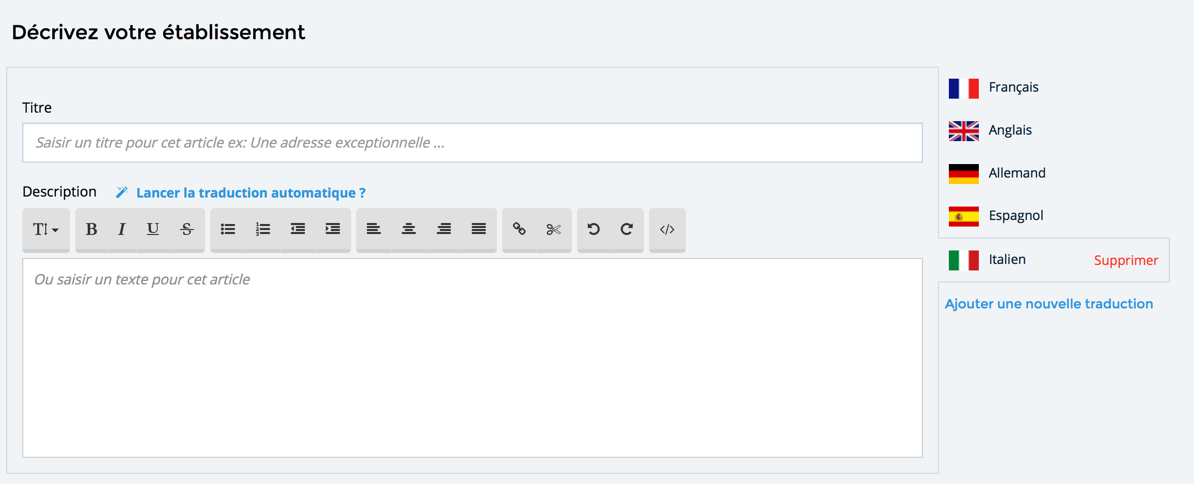
This section presents screens dedicated to the translation of your articles, your commercial documents (the price includes, the price does not include...). These screens are the same for:
- Your Description main , i.e. that of your institution]]]]]]
- The Description of your tender (rooms, activities, courses...)]]]]]]
- The Description of your special offers and your specials ]]]]]]]]]]]]
To translate your texts into foreign languages and display it on your booking engine:
- In the main Menu, click on Description, ]]]]]]
- Click on the tab Article, ]]]]]]
- Click on add a new translation, ]]]]]]
- Select one from languages offered, ]]]]]]
- Then click on add, ]]]]]]
- You can enter yourself your article translated,
- Or activate automated translation by clicking on the link start automatic translation?]]]]]]]]]
- Click on Save to validate your new version]]]]]]
Important :]]]
- The translation of your article is instantaneous.
- You can however modify or complete the proposed translation.
- If you change the major version of your article or your commercial description, do not forget to restart a translation of your text so that your new version changes are taken into account.
Comments
0 comments
Please sign in to leave a comment.